



Writesonic is an AI writing tool developed by a company specializing in artificial intelligence tools for content creation. This was Founded by Samanyou Garg in October 2020 and is based in San Francisco. Writesonic utilizes advanced technologies like GPT-3.5 and GPT-4. So to generate high-quality content across various formats such as articles, blog posts, ads, landing pages, emails, and more.
The platform is designed to assist users in automating their writing tasks, saving time and energy while producing top-tier content with minimal input. Writesonic is known for its versatility, supporting content creation in 25 languages. It also allows users to set the tone of the content based on their preferences, from professional to humorous.
Additionally, Writesonic integrates with tools like SurferSEO to enhance content optimization for search engine rankings and provides features like content rephrasing, sentence expansion, and paragraph condensation to refine and improve generated content.
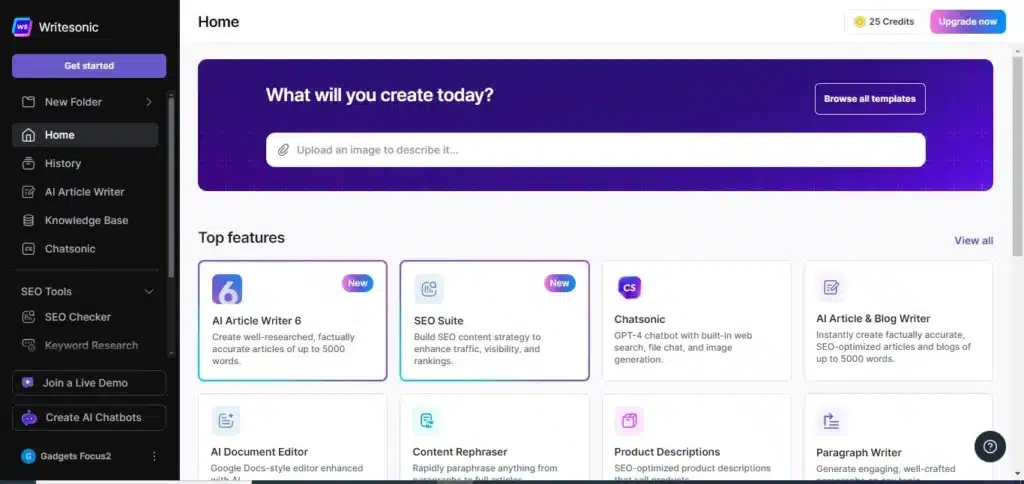
Features of Writesonic:
- AI-Powered Content Generation: Utilizes AI algorithms to swiftly create content across different formats such as blog posts, ads, and social media content.
- Versatile Templates: Provides a wide array of templates for various content types, enhancing flexibility and usability.
- User-Friendly Interface: Designed with simplicity in mind, making it accessible even to users with limited technical expertise.
- Cost-Effective Solution: Offers subscription plans starting at $13/month, catering to different budget constraints, particularly beneficial for small businesses and startups.
- Plagiarism Checker: Ensures content originality and grammatical accuracy, contributing to high-quality outputs.
Advantages of Writesonic:
- Time Efficiency: Saves time for content creators by swiftly generating high-quality content, ideal for professionals with tight deadlines.
- Versatility in Content Types: Capable of creating various content types such as blog posts, social media content, and product descriptions, catering to diverse needs.
- Cost-Effective: Provides a cost-effective alternative to hiring professional copywriters, making it accessible to businesses with varying budgets.
- Content Quality: Maintains grammatical accuracy and contextually sound content, serving as a solid foundation for further refinement.

Disadvantages of Writesonic:
- Lack of Human Touch: Lacks the creative nuances and innate understanding that human writers bring to content creation.
- AI-Detected Content: This may produce content resembling existing material on the internet, potentially impacting SEO and raising plagiarism concerns.
- Limited Industry-Specific Knowledge: Struggles with highly specialized or niche subjects requiring in-depth industry expertise, where human writers may outperform AI-generated content.
Pricing of Writesonic:
- Subscription Plans: Offers various plans starting at $13/month, with customizable options for individuals, teams, and enterprises.
- Credits System: Credits are used for accessing advanced templates and workflows, with additional credits available for purchase starting at $10 for 100 credits monthly.
- Refund Policy: Provides a 7-day risk-free refund policy for customer satisfaction
Overall, Writesonic is a powerful AI writing assistant that has gained popularity among businesses, content creators, and marketers for its ability to streamline the content creation process and deliver high-quality results efficiently.
For the latest tech news, follow Gadgetsfocus on Facebook, and TikTok. Also, subscribe to our YouTube channel.